Google Customer Reviews
" Thank you for purchasing our plugin. please feel free to email via our user page contact form here. Thanks so much! "
It has been announced that Google is replacing Google Trusted Stores program with
Google Customer Reviews. Google Customer Reviews program allows a merchant to request product reviews from customers & get them displayed on the merchant site as a Google Customer Review Badge. The more customer reviews you have, the more shoppers will get the confidence to shop on your Magento e-commerce Store.
Note : order to start, a merchant has to sign up for
Google merchant center account. The merchant's e-commerce store must comply with all the technical guidelines given by Google to successfully display a badge on the store. Check all technical guideline
here.
Our Google Customer Reviews extension helps to configure & populate script on the Magento store frontend by allowing all required field configurations from the backend. This extension also auto checks the order success page & injects a chunk of script code meant to be for the success page only. They are given all dynamic options like position, merchant id, etc. These can all can be managed from the backend. Quick installation & easy configuration makes the merchants job easier than ever.
Here is few highlighted features:
- Integrate google customer rating badge javascript on all e-commerce pages with dynamic variables ex. merchant Id, badge position etc
- Auto checks order success page & append Google Customer Reviews survey opt-in module to order confirmation page.
- Easy installation & configuration in just no time.
- Backend configuration for merchants to manage dynamic fields like MERCHANT_ID, POSITION ("BOTTOM_LEFT", "BOTTOM_RIGHT"), LANGUAGE etc.
All the collected ratings from Google Customer Reviews apply to your seller ratings on Google Shopping. The best thing is that installation & getting it working is simple process, with just a few clicks. It simply allows a merchant to complete Google javascript code integration nearly in no time by injecting all dynamic fields right from the backend without any error on the script.
Notes:
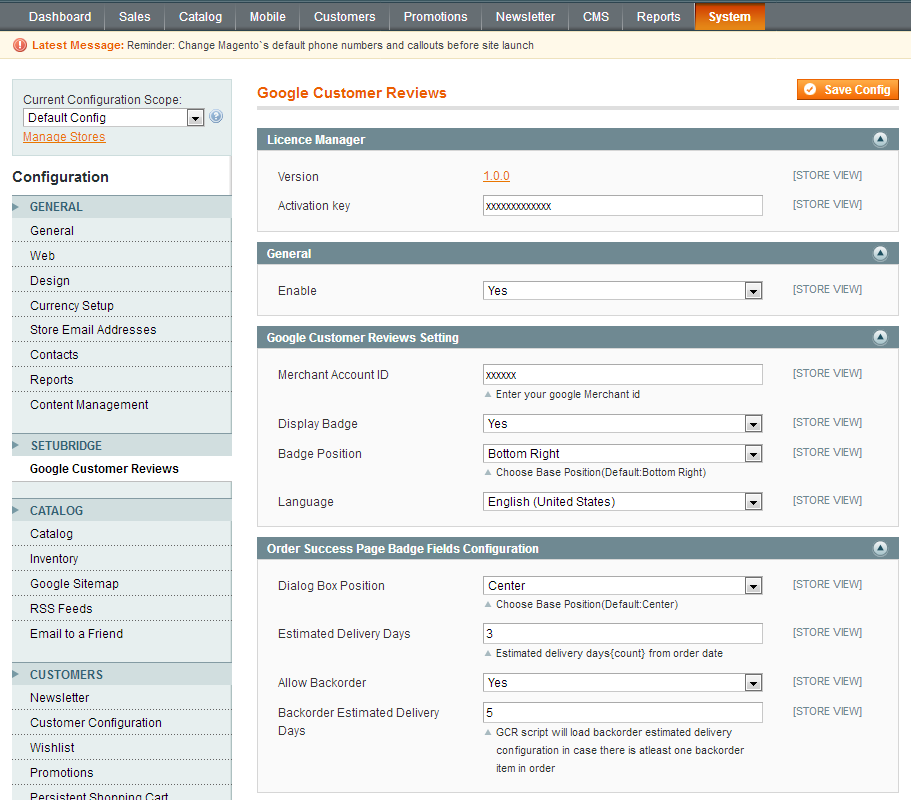
Easy Installation & Activation right from backend, To use this Google Customer Reviews extension you have to Go to STORES> Configuration > SETUBRIDGE > Google Customer Reviews Tab:
- Here is an option to Enable Google Customer Reviews
- You need to enter your Merchant Account ID in given field.
- If you want to display "GCR Badge" enable it from given option and also able to set GCR Badge position in BOTTOM_RIGHT and BOTTOM_LEFT.
- You can able to set Language of your choice.
- Just choose any Dialog box position from drop down options to get display in success page.
- You can able to set number of Estimated Delivery Days in given field.
- Here is an two option for Backorder "YES" and "NO", If you want to allow Backorder then set it as "YES" and option to set Backorder Estimated Delivery Days.
Here you can find answers to frequently asked questions. Feel free to contact if you can't find answer to your question.
1. Can I participate in Google Customer Reviews in my country?
Google Customer Reviews is only available to advertisers whose Merchant Center accounts are based in the following countries: Australia, Austria, Belgium, Brazil, Canada, Czechia, Denmark, France, Germany, India, Italy, Japan, Mexico, New Zealand, Netherlands, Norway, Poland, Russia, Spain, Sweden, Switzerland, Turkey, United States, and the United Kingdom.
2. Do I have to display the Google Customer Reviews badge on my website?
No, displaying the badge on your site is optional.
3. What happens if I don't have a seller rating?
Your Google Customer Reviews badge will state 'Rating not available' instead of a rating (i.e. the numerical value and star rating). A minimum of 150 reviews is required to establish a seller rating.
4. Can I participate in Google Customer Reviews if I do not sell physical products?
Yes, GCR does not require participants to sell physical products. You must be able to provide an estimated delivery date (EDD) for the items you sell in the order confirmation module (i.e. the date you expect the good/service to be consumed).
5. What is the "order confirmation module"?
"Order confirmation module" refers to the JavaScript on the purchase confirmation page that launches the survey opt-in window.
6. Can I display the "order confirmation module" code for Google Shopping visits only?
No, Google Customer Reviews requires that you display the survey opt-in to all customers after they checkout on your website.
7. Can I show the survey question directly on my purchase confirmation page?
No, you cannot show the survey question on your purchase confirmation page. To provide the most valuable feedback about purchases on your site, we want customers to respond only after they've received their goods or service.
"If you have any other questions or problems regarding this plugin, you can always contact me using the contact form on my profile page and I'd be happy to help. No guarantees, but I'll do my best to assist."
Our support operators are always glad to help you here [email protected]
Note: We are happy to help with setup and any bugs you may stumble upon.