Quick Register
" Thank you for purchasing our plugin. please feel free to email via our user page contact form here. Thanks so much! "
When a customer tries to buy something online, he/she needs to create an account and place the order. A lot of information is needed when creating a new account and this may discourage customers to visit your store. The Quick Register extension is a booster tool to increase customer registration for your online store. This extension is a perfect option to avoid this type of situations, it helps you to convert guest customers to registered customers on your success page. By using this extension you can provide your customers with a user-friendly register experience that doesn't disrupt their user flow.
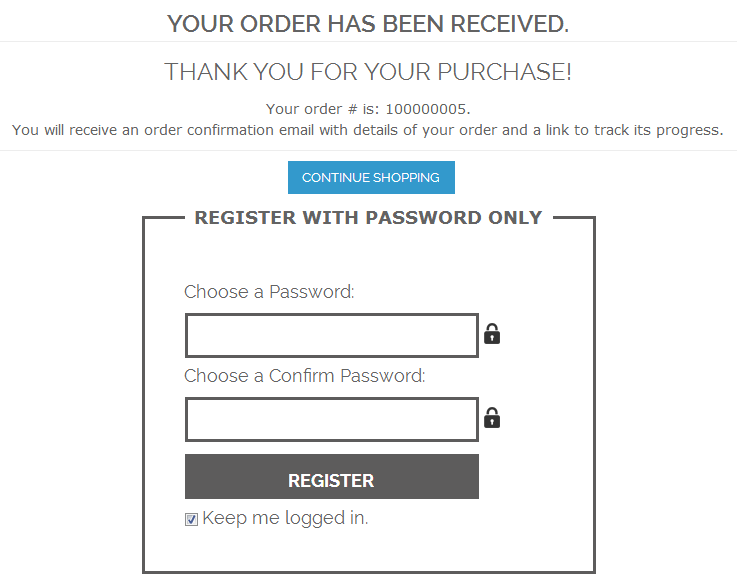
After completing the checkout process, a success page consists form with password field for a new account. Just customer need to create their password to register, no other information is required. The customer just needs to click register button, after submitting a password an account is created and they get registered. After the successful registration, they will easily continue the shopping.By saving customers time and preventing unnecessary obstacle on the customer's ways of purchasing makes the whole shopping process more efficiently and conveniently.
Here is few highlighted features:
- Enable/Disable from admin panel
- Easy backend configuration
- The customer can get register from a success page
- Straightaway register customer with a password
- Reduce visitor's registration time
- Increase the number of registered customers
- No coding standards needed activating extension on a store
- Added confirm password field
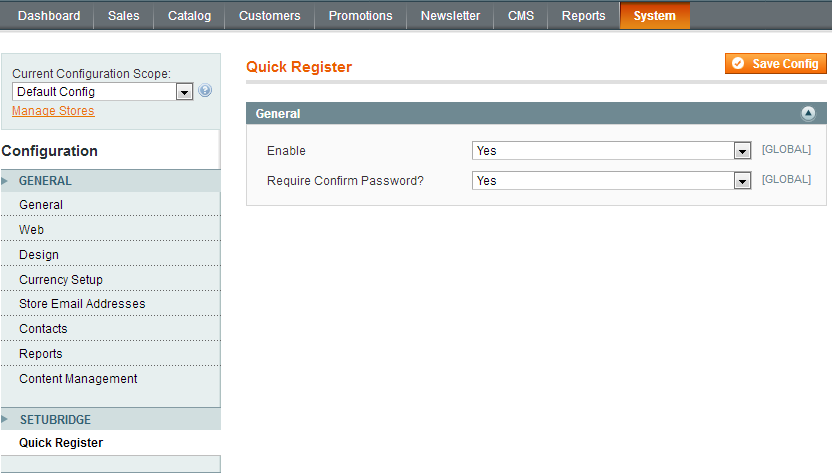
To use this Quick Register you have to Go to System > Configuration > Quick Register Tab:
- Here is a configuration option to Enable/Disable Quick Register extension.
- Ask user to success page if select for required confirm password Yes/No
- Ask user to quick register with popup fill detail on success page
Here you can find answers to frequently asked questions. Feel free to contact if you can't find answer to your question.
1. Does Support Support to multiple store ?
Yes
2. Customer need to fill extra information for registration from a success page?
No, there is no need to fill extra information just enter password and create account.
"If you have any other questions or problems regarding this plugin, you can always contact me using the contact form on my profile page and I'd be happy to help. No guarantees, but I'll do my best to assist."
Our support operators are always glad to help you here [email protected]
Note: We are happy to help with setup and any bugs you may stumble upon.