- Overview
- Screenshots
- Description
- Reviews
- FAQ
- Changelog

Magento 2 Mini Cart Extension
The Magento mini cart or quick cart extension allows you to apply the coupon code and proceed to checkout directly from the mini cart.
3+ Downloads
$99
Lifetime access to original source code
1 Yearfree support & update
45 days money back guarantee
Feature:
- Improve Minicart through additional information & effect
- Quick add product to the cart through AJAX
- Add coupon & cart summary in quick cart
- Increase-Decrease quantity directly from cart drawer
- Direct checkout from the quick cart
Screenshots
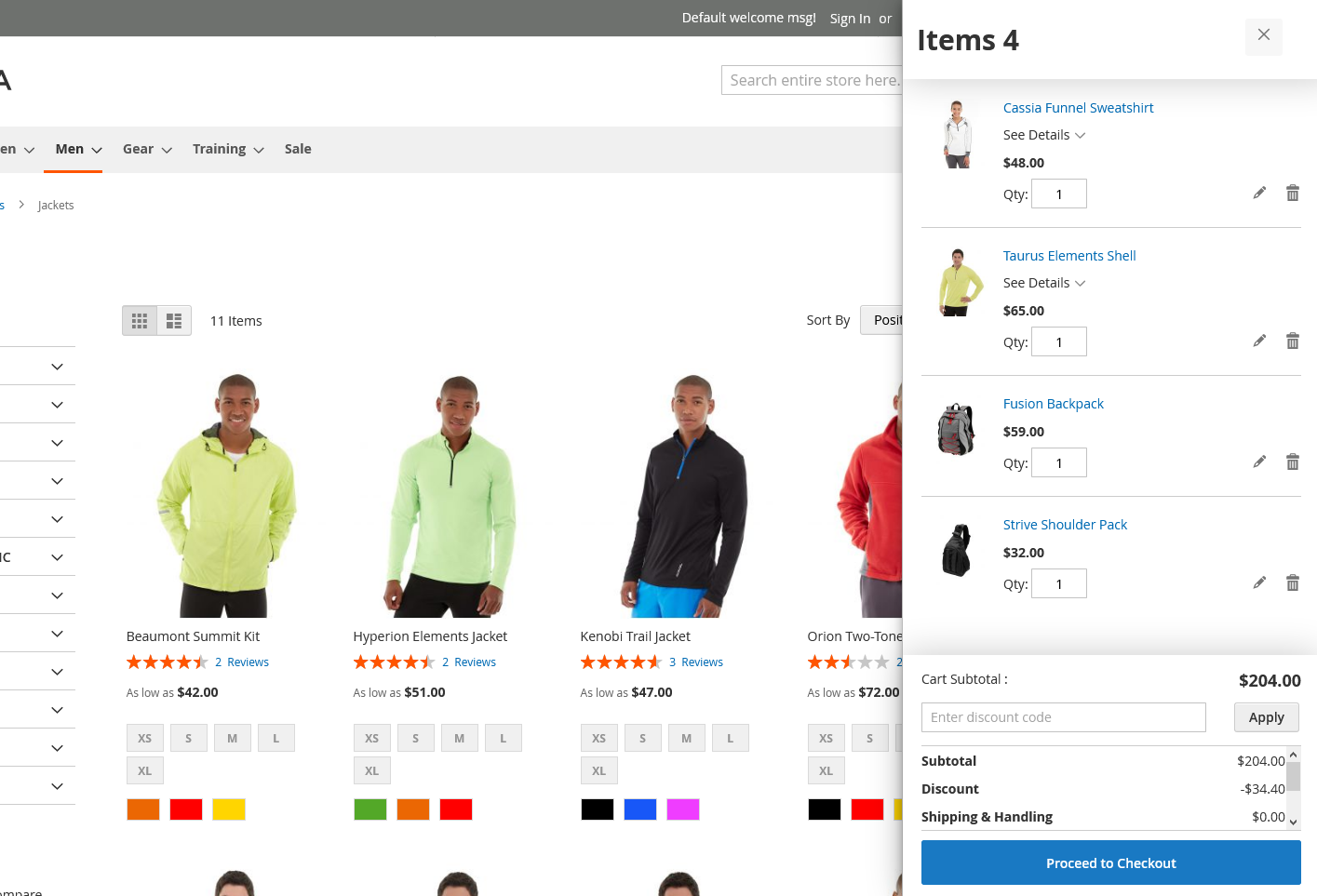
With the click on the Cart icon displayed on the right-side top, the customer will be presented with a mini cart, consisting of the required information about the products and the total amount.
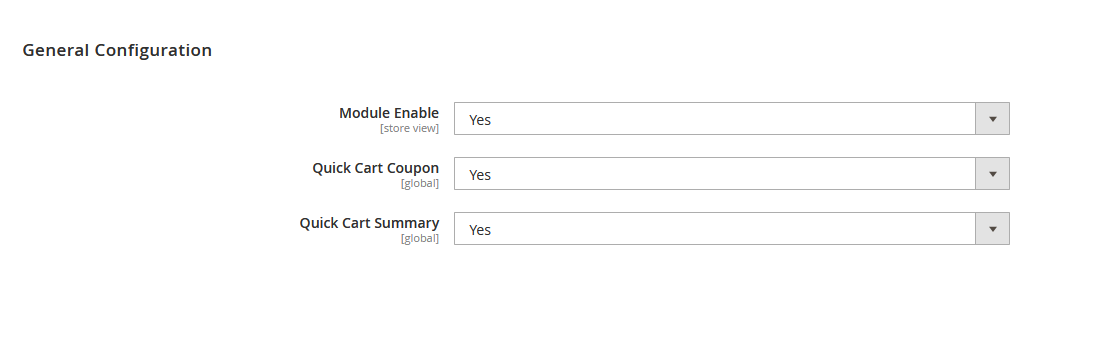
The Admin panel has control to enable/disable the module. The admin can also enable/disable the display of cart summary as well as the option for the application of the coupon code.
Description
HOW MAGENTO 2 QUICK CART DRAWER EXTENSION WORKS?
The longer you keep the checkout page away from the customers, the longer it takes for them to make a faster decision and purchase. SetuBrigde’s Quick Cart Magento 2 Extension offers the Magento store admin to modify the default Magento quick cart presentation with a more clear, attractive, responsive, and informed quick cart.
The extension enhances the layout of the quick cart and makes it more informative and operative. Besides, it adds a slide-in effect for the display of the mini cart, improving the interface of the default Magento mini cart, making abandoned cart rates low.
The extension enhances the layout of the quick cart and makes it more informative and operative. Besides, it adds a slide-in effect for the display of the mini cart, improving the interface of the default Magento mini cart, making abandoned cart rates low.
What Magento 2 Quick Cart Extension Serve?
The extension serves the purpose of enhancing the shopping experiences of the customers and increases the sales amount by deducting the need of going through the cart page to place an order. As the customer clearly gets to see all necessary information required to place an order in the mini cart, further can proceed to checkout directly from the mini cart.
The quick cart extension allows customers to view clear information of the products added in the mini cart, increase or decrease their quantities, remove products, apply coupons, and view totaling information like cart subtotal, tax amount, and grand total. The admin can configure to enable/disable the display of cart summary as well as the coupon code application option.
The quick cart extension allows customers to view clear information of the products added in the mini cart, increase or decrease their quantities, remove products, apply coupons, and view totaling information like cart subtotal, tax amount, and grand total. The admin can configure to enable/disable the display of cart summary as well as the coupon code application option.
Magento Mini Cart Extension Features:
- Fully responsive and interactive cart popup
- Displays quick cart in clean, attractive & informed way
- Personalized mini-cart with slider-in effect
- Enable/disable the to display the “Apply coupon code” option
- Product quantity selection
- Enable/disable option for the display of cart summary
- Enhances the shopping experience by reducing checkout steps
Customer Review
How does Magento 2 Mini Cart Extension help admin?
Easy to use and with great support
Nov 10,2020
It is important to know that I can get quick and professional support if needed.
Very happy with it. Highly recommended!Changelog
Version 1.0.0 CE
Nov 04, 2020
- Initial Release
Frequently Asked Questions
Does this mini cart extension work with all themes and extensions by other vendors?
- SetuBridge extensions work with all the plugins, as well as with many third-party plugins. We'll definitely try to help you if you face any technical issues, please create a ticket at [email protected].
Can I get free updates and support?
- Yes, you will get 6 months of free support and 1 year of product updates with the purchase.
Are you able to provide installation services?
- Yes, you can use the installation and configuration services that are provided with every extension purchase.
Is it possible to test the quick cart extension on a staging site before transferring it to a live one?
- Yes, you can switch on the production domain from your test domain after configuring all the settings.
Is the SetuBridge extension available to install with a one-time payment or subscription-based?
- The extension is available to install & integrate with the store with a one-time payment.
In case I need additional features for an extension, how can I request them?
- You can send an email to [email protected] with your requirements for the extension.
How can I get a refund?
- You can read out the refund policy for more details.
Related Products